Attendance Intelligence Automation
Project Overview
This project involved designing and implementing a production-ready attendance automation that passively captures daily attendance signals from Microsoft Teams, manages exceptions, and provides managers with a clear and structured summary, without changing how employees already communicate.
The solution balances automation with human flexibility, ensuring accuracy while supporting a flexible work environment.
Business Context
The team operated with flexible working hours, with an expectation to begin work by 9:00 AM. Attendance was informally communicated through morning greetings such as “Good morning” or “Hello” in a shared Microsoft Teams channel.
This informal process:
- Required managers to manually monitor messages
- Made it difficult to consistently identify late arrivals or absences
- Provided no structured or auditable attendance record
- Led to frequent manual follow-ups
Solution Design
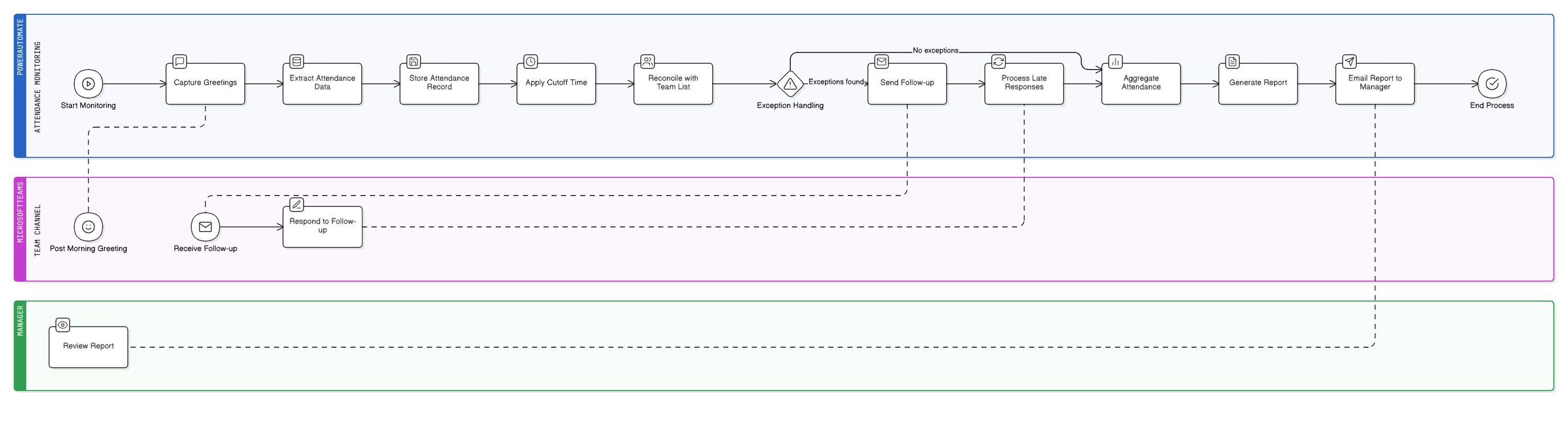
I designed an automated workflow using Power Automate that monitors Teams messages during a defined morning window, reconciles check-ins against official team membership, manages attendance exceptions, and generates a daily attendance summary for management.
The workflow refreshes and runs every weekday morning, ensuring a clean and consistent attendance cycle.
How the System Works
1. Attendance Signal Capture
- Monitors Microsoft Teams channel messages on workdays
- Detects predefined greeting keywords such as “Good morning” and “Hello”
- Extracts sender work email, timestamp, and message content
- Stores one attendance record per user per day to prevent duplicates
Attendance is tracked using official work email identifiers rather than display names to maintain accuracy and consistency.
2. Time-Based Business Rules
- Implements a 9:10 AM cutoff aligned with the office’s flexible start policy
- Messages received before the cutoff are automatically recorded
- Users who miss the cutoff are flagged for follow-up rather than immediately marked absent
This approach enforces policy without rigid or punitive automation.
3. Exception Handling and Follow-Ups
- Reconciles attendance against the full Teams membership list
- Accounts for approved leave, partial-day leave, and known absences
- Sends one-time, personalized follow-up messages to users who did not check in by 9:10 AM
- Allows late arrivals to clarify their status, such as joining a meeting, arriving late, or being in transit
Responses are incorporated into the same-day attendance summary when applicable.
4. Management Reporting
- Aggregates attendance status by mid-day
- Automatically emails a structured daily report to the team manager summarizing:
- Active team members
- Late arrivals
- Approved leave
- Unexplained absences
This provides timely visibility while minimizing manual effort.
Deployment and Documentation
Created end-to-end documentation covering workflow logic, business rules, and exception handling. Documented usage guidelines to support consistent adoption and prepared the solution for organization-wide rollout with minimal onboarding.
Impact and Outcomes
- Eliminated manual attendance monitoring
- Reduced follow-up effort for managers
- Improved clarity around daily team availability
- Established a consistent and auditable attendance process
- Achieved high adoption by integrating seamlessly into existing workflows