Vacation Request Automation
Project Overview
This project involved designing and implementing a structured vacation request automation that replaces informal emails and chat messages with a single, reliable workflow.
The solution streamlines submission, approval, communication, and calendar updates while keeping the experience simple for both employees and managers.
Business Context
Vacation requests were previously handled through unstructured emails or messages, which caused several operational issues:
- Requests were easy to miss or delay
- Approval status was unclear to employees
- Managers lacked a centralized view of leave
- Calendar conflicts occurred due to delayed updates
- There was no consistent audit trail
The goal was to create a system that was easy to use, transparent, and reliable for planning.
Solution Design
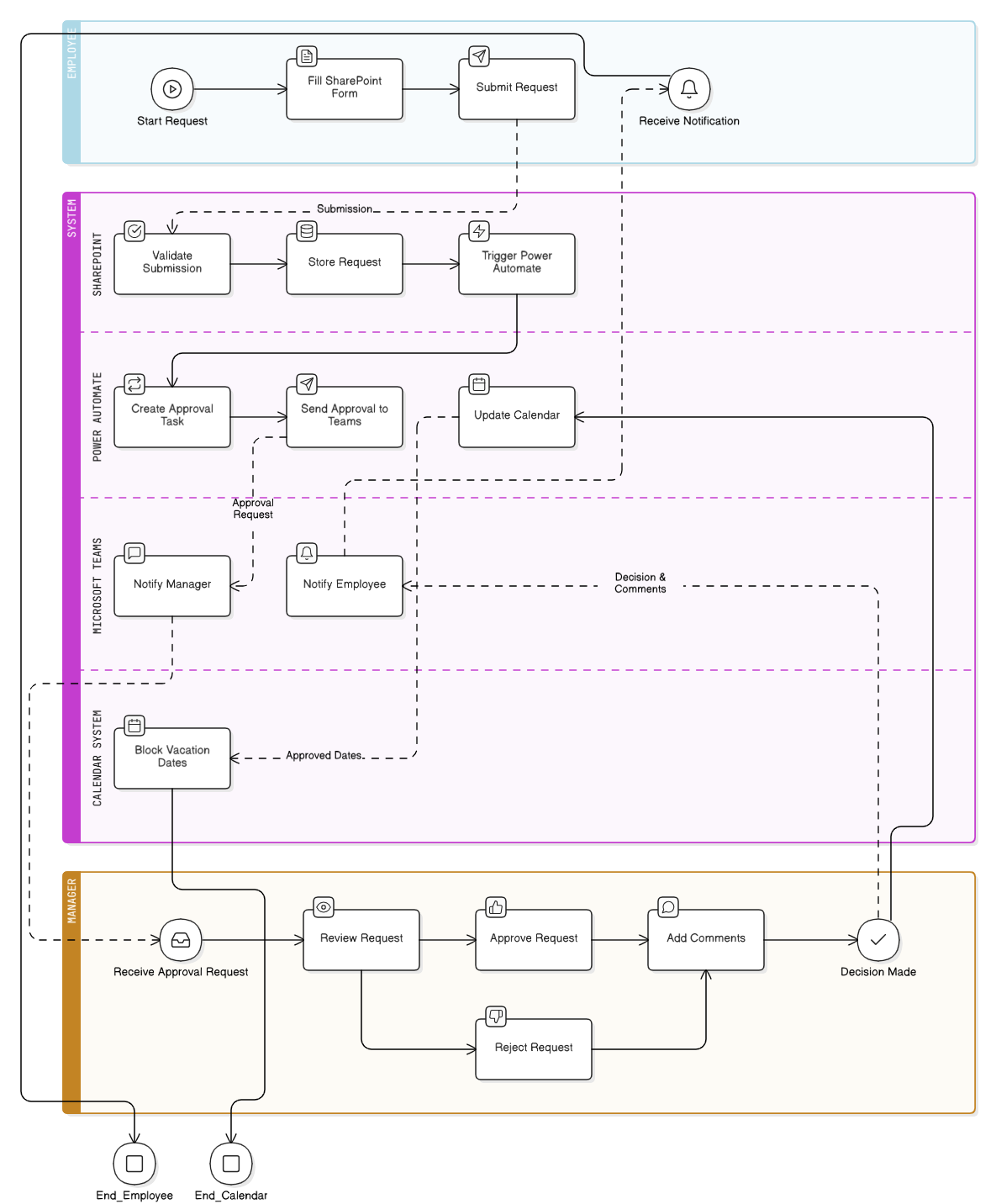
I designed an automated vacation request workflow using Power Automate that integrates SharePoint forms, Microsoft Teams approvals, and calendar synchronization.
The workflow allows managers to approve or reject requests directly within Teams and ensures employees receive timely confirmation while keeping calendars up to date.
How the System Works
1. Request Submission
- Employees submit vacation requests through a structured SharePoint form
- The form captures start date, end date, reason, and reporting manager
- Submissions are validated before entering the approval flow
This ensures all required information is captured consistently.
2. Teams-Based Approval Workflow
- Submitted requests trigger a Power Automate approval flow
- Approval requests are sent directly to the manager in Microsoft Teams
- Managers can approve or reject the request with a single action
- Optional comments can be added during approval or rejection
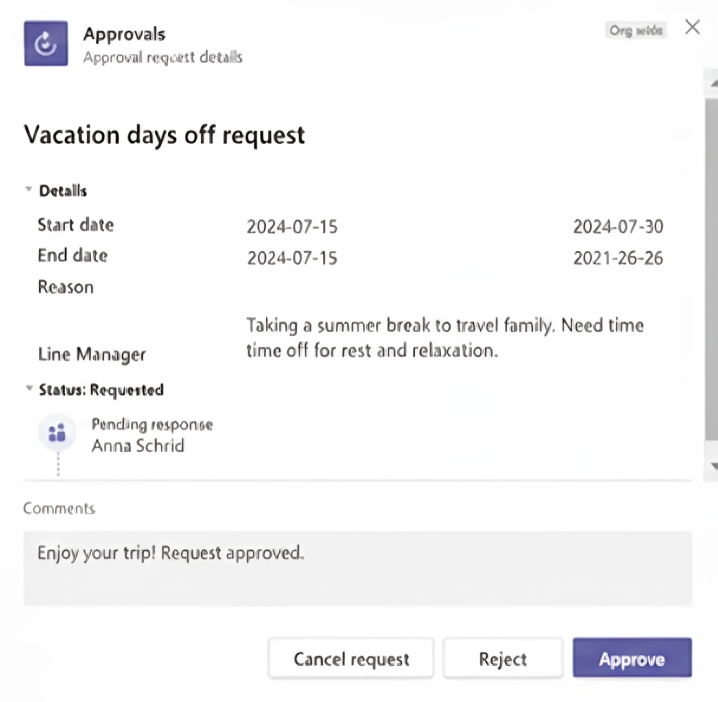
This allows managers to take action quickly without leaving Teams.
3. Employee Notification
- Approval or rejection decisions are automatically sent back to the employee through Microsoft Teams
- Employees receive clear confirmation along with any manager comments
This closes the communication loop and eliminates follow-up messages.
4. Calendar Automation
- Upon approval, the employee’s calendar is automatically blocked for the approved dates
- Team availability becomes immediately visible for planning purposes
This prevents scheduling conflicts and improves visibility across the team.
5. Tracking and Record Management
- Vacation requests and outcomes are stored in a structured format
- Records provide traceability and support future reference
- The system acts as a single source of truth for vacation data
Deployment and Documentation
Documented workflow logic, approval paths, and business rules. Provided usage guidance for employees and managers and prepared the solution for broader, organization-wide rollout.
Impact and Outcomes
- Reduced approval turnaround time
- Eliminated missed or forgotten vacation requests
- Improved transparency for employees and managers
- Reduced manual coordination and follow-ups
- Established a consistent and auditable vacation request process